Every block should be measurable

This page is measuring you reading it.

The analytics layer for the WordPress block editor. Every section you scroll past, every second you linger, every click — recorded live in the panel, sent nowhere. That's the product: Block Insights shows this for every visitor combined, on every page of your WordPress site.

the panel is already running — keep scrolling
Pricing page1,000 views · 30 days
1Hero heading0%—
2Intro paragraph0%−5
3Feature grid0%−3
4"How onboarding works"0%−46
5Pricing table0%−4
6Call to action0%−2
Inside the page

Every page has a cliff

Readers don't leave at random — they leave at a specific paragraph, the same one, over and over. That's the table above: row 4 loses 46% of all readers, and the pricing table below it was only ever seen by a third of visitors.

Traffic analytics can't show you this. It counts arrivals and exits; inside the page, the trail goes cold. Block Insights measures the page itself, section by section, and puts the numbers right in your editor.

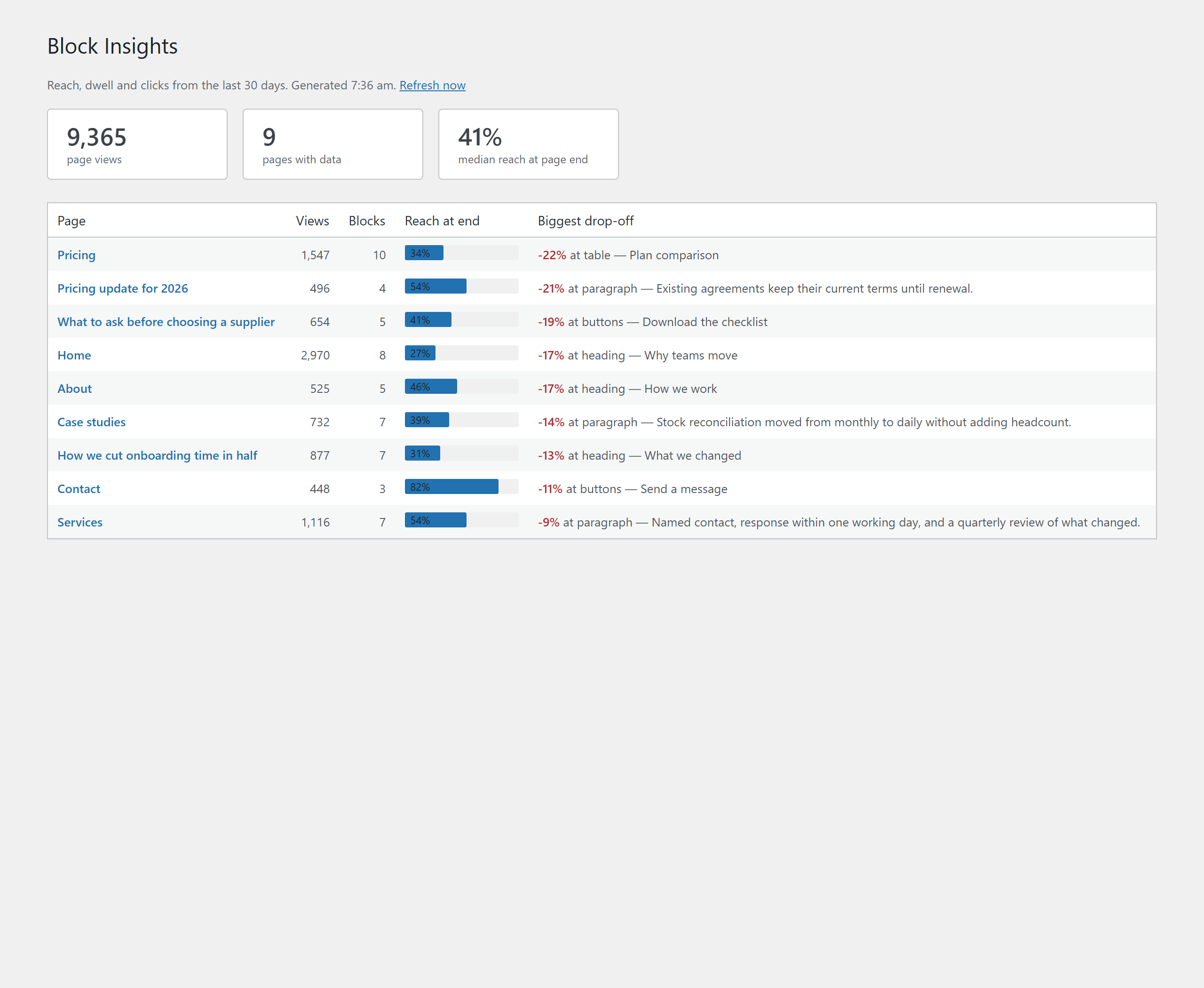
The Reports screen: every measured page listed worst drop-off first, each with its biggest loss named.
The Reports screen. Every measured page, the one with the worst drop-off at the top, and the block it happens at named in words.
Only possible inside WordPress

Google Analytics doesn't know
when you edited the page.

You rewrote that paragraph on March 3 — did it work? External tools can't answer; the edit date isn't in their data. Block Insights records it automatically, and the comparison draws itself:

0%reached the end
30 days before
→
0%reached the end
30 days after
EDIT: MAR 3

Measure, edit, verify. That loop is the whole product.

Under the hood

Built for hosting you don't control

You'll install this next to plugins you didn't choose, on servers you've never seen. It's engineered for exactly that.

Invisible overhead

0.12 ms per page render, one 4 KB script, one request per visit — sent when the visitor leaves. Page caches welcome.

Nothing to consent to

No cookies, no visitor IDs, no stored IPs, no fingerprinting. Data lives in the site's own database and never leaves it.

A database that can't bloat

~47 bytes per block per day under a fixed row budget. Old daily data compacts into monthly totals — tables physically can't grow unbounded.

Reversible, provably

Uninstall strips every block ID and restores post content byte-for-byte. Run the DB diff yourself before you trust it.

Plays well with block libraries

Core blocks plus third-party libraries — Kadence and Spectra tested. Existing posts are never bulk-rewritten.

Sees its own blind spots

On activation it scans the site and reports exactly how many pages it can and cannot measure — before you invest any time.

What it can't do — honestly

Elementor, Divi and other builder pages keep their layout outside the block system: unmeasurable, full stop. If your whole portfolio runs on builders, this tool is not for you.

And it counts sections, not people — no unique visitors, no sessions, no demographics. Keep GA for "who came from where"; this answers what happened after they arrived.

Handing the numbers on

The numbers are a client deliverable

One click turns any period into a printable report — your logo, your client's name, plain language: here is where your readers stop, here is what changed since we fixed it. Attach it to the monthly invoice. Prefer raw data? CSV export, any range.

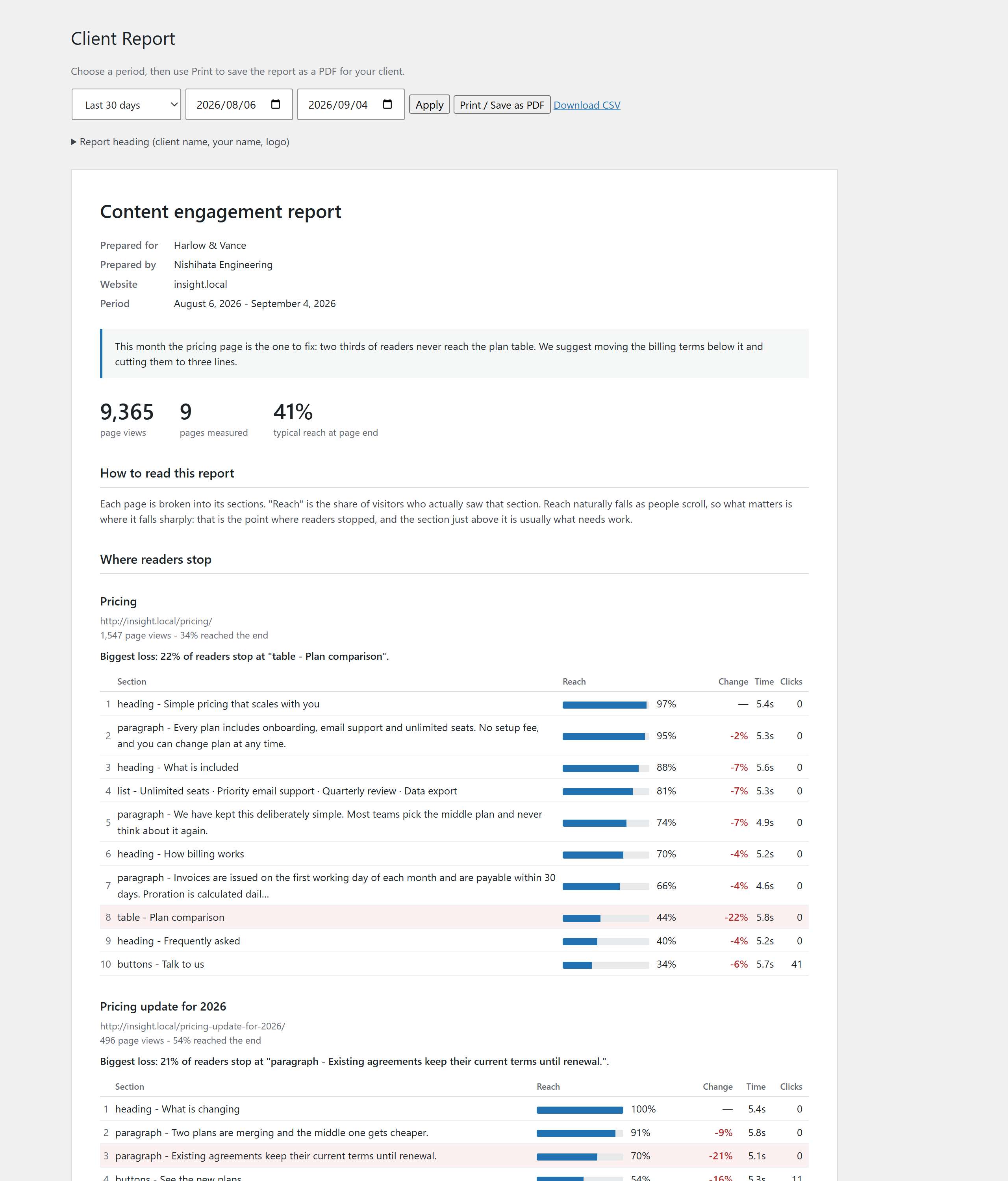
A client report: letterhead, period, total page views, and the pages with the sharpest drop-off broken down block by block.
A report as it prints. See the whole thing as a PDF.
0ms
render overhead / page
0KB
front-end script
0bytes
per block per day stored
0%
byte-exact restore on uninstall
What it earns you

A reason to send a proposal every month

Improvement work is hard to sell, because “this page could be better” is your opinion, and a client can simply disagree with it. “46% of readers stopped before the pricing table” is not an opinion.

  1. 1The report names itA section, a number, a date. Nothing to argue with.
  2. 2You add the fixYour recommendation, in the same document.
  3. 3That document is the proposalThe client is agreeing with data, not with you.
  4. 4Next month proves it31% became 58%. That is what renews the retainer.

That is the difference between a maintenance retainer you have to defend every quarter, and an improvement retainer that renews itself.

Pricing

One price, paid once

No subscription, no renewal date, and no tiers to weigh against each other.

Block Insights
for one WordPress site
$99once
1 site
Not a subscription. There is no renewal, so there is no year in which the price goes up.
Every feature · before and after · client report · CSV export · updates and support with no end date
Buy Block Insights

There is a free version on WordPress.org: the measurement in full, without the before-and-after comparison, the client report or the CSV export. It is listed there as OneCraft Block Insights.

Checkout and licensing by Freemius · One payment, no renewal, no expiry.
Sold without a refund window — so please read what it cannot measure before you buy.

Questions

Questions people ask

Will it slow my site down?

0.12 ms per render and a 4 KB script, measured. If you can spot it in a waterfall chart, we genuinely want to hear from you.

Do I need a cookie banner for it?

It sets no cookies and stores no personal data, so on most sites it adds nothing to your consent burden. Your lawyer outranks this paragraph, though.

We use Elementor on half our sites.

Then it will only help on the other half. The activation scan gives you the exact split per site before you commit real time. If everything runs on builders, this is not the tool for you.

How do I check my own pages before buying?

Open a page in WordPress’s own editor. If it breaks into blocks you can click one at a time — a heading, a paragraph, an image — it can be measured. If it opens in Elementor’s or Divi’s own editor, or arrives as one large slab of text you cannot take apart, it cannot. Check the pages you actually care about, not the whole site.

Is there a free version?

Yes. OneCraft Block Insights on WordPress.org is the free version, and it is the same code. What it leaves out is the before-and-after comparison, the client report and the CSV export — the three things you would hand a client. The longer name is WordPress.org’s doing, not a different product: they judged “Block Insights” too generic to list. Measure your own pages with it for a month, and buy only if the report is worth $99 to you.

Do I still need Google Analytics?

Probably. GA answers "who came, from where." This answers "what happened inside the page after they arrived." They don't overlap.

What happens if I uninstall?

Every block ID is removed and post content is restored to the exact original bytes. Posts that can't be restored perfectly are left untouched and listed — never rewritten.

Why is it not a subscription?

Nothing runs on our servers. The measurements are written to your own database and read from it, so there is no monthly cost for us to pass on. You pay once and keep the plugin, updates included, with no date attached.
Everything the panel just showed you about yourself — imagine it for every visitor you've ever had.

Get Block Insights

The panel ran entirely in your browser — nothing was sent anywhere.